Forum for the Colemak keyboard layout.
You may not post on this forum because you're not logged in.
Hi,
I will (probably) start taking lessons in Russian language in September, so I'm looking at options for typing in the Cyrillic alphabet.
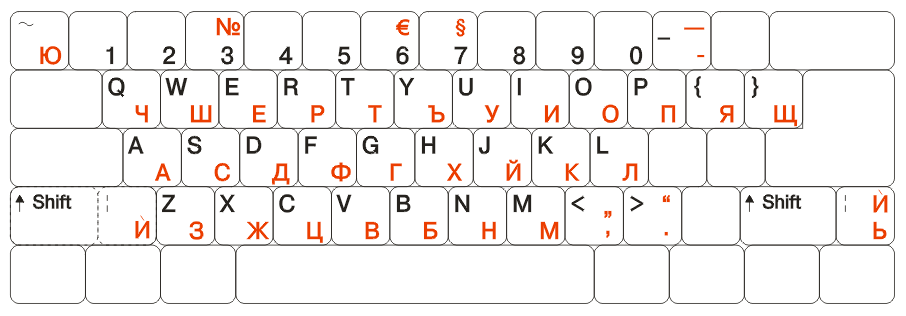
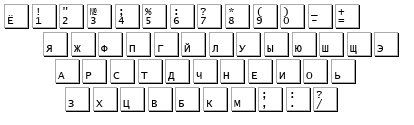
As I understand it, there are two major layouts in use; the "official" Russian keyboard, used in Russia and some other countries (available by default in the major operating systems), and a transliterated Qwerty-based layout, mostly used outside Russia by people who have to type Russian occasionally. The latter could probably be Colemak'ized, and be easy to learn for an existing Colemak user, but would probably be far from optimal for typing Russian. However I've read not so good things about the official Russian keyboard either; the six most frequent characters are all on the index fingers! Its inventor probably tried to make it ergonomic, but didn't think about it very hard...
Does anyone here have experience with typing Russian, or another language using the Cyrillic alphabet? What keyboard layouts have you considered using? Which one did you end up with?
Thanks for any tips!
Last edited by ghen (25-Aug-2008 15:35:08)
Offline
Spasiba! :)
I made an attempt, but this is from a non-Russian so I may have done mistakes. Basically, I found the AZHERTY a place to start and went by transliterations. The Colemak was my basis, of course.
I got the same impression as you did: The standard layouts that exist are far from perfect. The jungle of layouts attests to this.
In Windows you have the interesting option of mapping a CapsLock state. What this means is that when I press CapsLock I can be typing Cyrillic. CapsLock again, and I'm back to the usual characters. Of course, layout selection can be hotkeyed but I think it's rather nifty.
Getting a fully optimized ergonomical layout is for the native Russians. I wouldn't worry about it, and would think that multilingual users are better served by simply transliterating what they're used to.
If you're interested in what I did, you'll find it in the .doc file in my Norwegian layout download at http://folk.uio.no/obech/Files/Keyboard … olemak.zip (if you're having trouble with the MS-Word doc, let me know and I'll upload an .rtf instead - I've just been to lazy/busy to do it yet). There's lots of columns in there and you'll see that I put the whole Cyrillic alphabet on a dead key(!) but the principle is the same as a normal mapping. Some characters had to go to different columns, but unless I'm mistaken most of them are fairly rare and/or belong to non-Russian Cyrillic scripts.
I use the Cyrillic alphabet very rarely as you can imagine, mostly for song lyrics.
Best of luck, and if you find something interesting then keep us posted!
Offline
Heh, DreymaR, is there anything keyboard-related that you have not yet personally researched? :-)
This looks interesting, thanks! But... could you perhaps post a pdf or something similar, because OpenOffice seems to be chocking on your doc (perhaps because of all the special characters?)...
I agree with your idea that a fully optimized layout is not worthwhile when I only want to type Russian occasionally — too much learning effort for too little benefit. So I think I better create my own transliterated Colemak variant for easy learning & (relatively) easy typing. I'll definitely look into your design.
Offline
I type in Russian occasionally and I am fine with using the transliterated Russian keyboard that fits my Colemak keyboard. I even have the installation file that I found on some college student's website a few years ago. I am not very concerned about comfort since I don't type using that layout as often. Plus I am very fast with it without having to learn a new layout since ARST is АРСТ and I can flip layouts with just a keyboard shortcut.
Offline
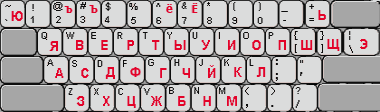
This is what I came up with so far, codename "Rulemak":
Ъ 1 2 3 4 5 6 7 8 9 0 - Ч
Я В Ф П Г Й Л У Ы Ю Ш Щ Э
А Р С Т Д Х Н Е И О Ё
` З Ь Ц Ж Б К М , . /The transliterated mapping is mostly that of KOI8-R to ASCII (when dropping the 8th bit), applied to Colemak, with some tweaks here and there. All Latin characters, as well as the missing punctuation characters, are available with AltGr on their original (Colemak) positions. I've placed semicolon and colon on the Shifted comma and period (instead of <>) though.
I have an X11 xkb file for those interested.
This layout is probably far from optimal for typing Russian, but it'll take years anyway before I'll be able to think faster in Russian than I can type. :-) But it's easy to remember for existing Colemak typists. And looking at letter frequencies in Russian, it shouldn't even be that bad (I guess transliterated Qwerty is far worse).
Todo: add additional Cyrillic characters for other Slavic languages (probably with AltGr on the number keys).
Shai: is there any chance something like this could ever become an official Cyrillic variant for Colemak?
Offline
For now, I'd think the chances of "official" are slim. The Colemak layout was researched for use with English and so creating additional variants like this might come under criticism. More importantly, I don't think that Shai has time to maintain several variants. That's just for now though - if things settle down and become popular I'm sure something like that would have the right to be seen. :)
Offline
I was thinking of using a layout like that for Bulgarian, but decided against it because there will be too many words that can be typed with only one hand. I was also going to swap A and S because as A is the most common letter in Bulgarian I could not have it under my weakest finger. O in Russian is in a similar situation, but it's easier to use the right pinkie than the left one.
I decided to use the Bulgarian national layout for a while, see how it feels, and perhaps move E and I to Colemac A and R. But learning two different layouts is hard and sometimes I am thinking of switching to a phonetic layout. I will probably not do that though.
Offline
In my experience, a great many of the national layouts are crap. No idea whether that applies to the Bulgarian one or not, but be warned.
I have no problems typing A - it's whatever takes the pinky away from its' home position that causes me trouble. And I'm not sure the pinky is your weakest finger when it comes to typing - the ring finger may have more strength per se but that doesn't help it much since it's usually the least independent finger so it stresses more and is harder to use right.
When it comes to same-hand, it's largely a question of whether you can do it with rolls or not. The worst situation may be if you have to roll a bit in one direction and then turn - like in Colemak 'rats'.
Zaratustra Zaratustra Zaratustra Zaratustra - ugh. :)
Last edited by DreymaR (07-Sep-2008 17:09:02)
Offline
I guess the Bulgarian layout, created 101 years ago, was perfect for the typewriters at the time (as it places all the emphasis on the middle and index fingers), but even today at least it makes some sense and it's a standard and available everywhere, and most importantly, no one has made a much better one. All the volwels are on the left and the letters are arranged according to their frequency:
, у-1.54 е-9.21 и-8.82 ш-0.42 щ-0.43 к-2.99 с-5.02 д-3.11 з-2.36 ц-0.75 ; ь-0.01 я-1.86 а-11.60 о-8.75 ж-0.77 г-1.19 т-7.38 н-8.09 в-4.71 м-2.68 ч-1.44 enter ю-0.11 й-0.32 ъ-1.71* э-0.00* ф-0.37 х-0.67 п-3.05 р-5.42 л-3.57 б-1.65 shift
* — these keys were used more often before the 1945 spelling reform.
What bothers me the most is the position of е and и and I may end up moving them to the home row, but at first I'll try not to.
Offline
After using it a few months myself, I have now finalized my Russian layout. With this layout I can type Russian rather fluently and without thinking, as you mostly just type transliterated Russian:
Ъ 1 2 3 4 5 6 7 8 9 0 - Ь
Я В Ф П Г Й Л У Ы Ю Ш Щ Э
А Р С Т Д Ч Н Е И О Ё
' З Х Ц Ж Б К М , . /I considered swapping ь and ё, since ь is more common, but I preferred to keep the layout logically organized: ё (yo) phonetically next to о, and ь symmetric wrt. ъ, since the goal was to create an "easy to remember" layout for Colemak users rather than a fully optimized layout (for that, ь would have to be moved elsewhere anyway due to the rather common -шь in verb endings). The rest is mostly phonetic. Key 102 (next to z/з) is Unicode character U+0301, the accent used to indicate stress (important for correct pronounciation), as seen in Russian dictionaries.
Additionally, # (above 3) is replaced by the Russian number sign №. # itself is available through AltGr-3. Russian quotes «» are available through AltGr-[], like in Colemak, and [] are available through AltrGr-(). Because ;: are missing, I placed them on <> (logically on Shift-,.), and <> are available through AltGr. On the letter keys, AltGr yields the corresponding Latin character from the Colemak layout. Same for missing characters '"\|{}=+.
I called the layout "Rulemak", for "Russian Colemak". "Tsolemak" would be an option too: if you enter "colemak" on this layout you get "цолемак", which in turn can be transliterated as "Tsolemak". :-) (similarly, the Qwerty-phonetic layout is often called "Yawerty", from "яверты")
PKL (for Windows) and xkb (for UNIX) implementations are available for those interested.
Offline
Ё is too rare to be on the home row. I would put it at ~, Ъ at =, and Ь at ". Ъ and Ь will be at the same finger, so it will be easy to remember.
Offline
I just use the phonetic colemak variant for Bulgarian.
Here's my Bulmak
ч 1 2 3 4 5 6 7 8 9 0 - = я в ф п г й л у ъ ; ш щ ю а р с т д х н е и о ' з ь ц ж б к м , . /
Comfortable :)
Here is the .dll file for windows. (.msi installer included)
Offline
Hi there. I have to type in Russian alot recently and was kinda curios is there russian layout like Colemak (which i'm using about 8 months for now).
Glad I've found this topic. I'm about to give ghen's layout some testing, and will write about results here.
Btw, ghen, how's your lessons? =)
Offline
I hope you/we could agree on a Cyrillic layout, so there isn't one Ghoul layout and one Ghen one and so on - but it's hard to do. Fortunately, most of the letters are agreed on - and all the most common ones too I hope. When it comes to local variations such as Russian versus Bulgarian I'd hope that these could be contained to a few keys. I've decided to use the '[', ']' and VK_102 keys for such local variants whenever I make a local layout. If I want a more compliant layout I only use the '[' and ']' keys with AltGr and put the most common local glyph on the VK_102 key. If you're using a keyboard in a country that needs extra glyphs, it will have the VK_102 key (or more!). It is still my belief that people in underdeveloped countries who don't use a VK_102 key should get themselves a better keyboard. ;)
I'd place the 'yo' on the '[' key. That way it doesn't occupy prime real estate, and it's phonetically analogous to the 'ĺ' which sits there in Nordic layouts (including even mine!). (My ']' key holds the 'ć' - or 'ä' if you're Swedish/German/whatever, and the VK_102 holds 'ř'/'ö'. I really wish that the Nordic-Germanic countries could reform and start using 'ā' and 'ō' instead of different and inconvenient letters, but that's not going to happen soon I guess...)
Last edited by DreymaR (30-Apr-2009 03:20:27)
Offline
ugh, almost forgot - ghen, can you share your Rulemak? pkl would be fine.
I promise to give it a proper testing (I'm a native Russian, so feel free to ask anything in Russian language you're uncertain of)
Offline
Здравствуйте! :-)
ai024 wrote:
ugh, almost forgot - ghen, can you share your Rulemak? pkl would be fine.
You can find it here. Create a "rulemak" subdir in your PKL layouts dir, and put my rulemak.pkl there as "layout.ini". You can put rulemak.ico there as "on.ico" and copy "off.ico" from the colemak layout dir.
If you want to move some keys in the layout, it's easy to do as the file is just plain text.
I put the following in pkl.ini to switch between Colemak/Rulemak by pressing both Control keys:
; The layout ini file is "layouts/[key value]/layout.ini" ; You can use multiple layouts, if you write: ; layout = layout1:Displayed name,layout2 layout = Colemak,Rulemak ; With this hotkey you can switch between layouts changeLayoutHotkey = LCtrl & RCtrl,RCtrl & LCtrl
As PKL basically re-loads when you switch layouts, you can make changes to the layout on the fly. However on an idle PC, switching layouts can take a while (disk spinning up and seeking), and you get Qwerty in the meanwhile. :-)
However I made all Latin letters available on their Colemak positions through AltGr, so no need to completely switch layouts if you just need to type one or two words.
ai024 wrote:
Btw, ghen, how's your lessons? =)
I don't have any, but you could use any existing Russian typing tutor program that doesn't mess with they keyboard itself?
Offline
ghen wrote:
Здравствуйте! :-)
You can find it here. Create a "rulemak" subdir in your PKL layouts dir, and put my rulemak.pkl there as "layout.ini". You can put rulemak.ico there as "on.ico" and copy "off.ico" from the colemak layout dir.
If you want to move some keys in the layout, it's easy to do as the file is just plain text.
Thank you, kind sir!
ghen wrote:
I don't have any, but you could use any existing Russian typing tutor program that doesn't mess with they keyboard itself?
Lol, I meant how's your lessons of Russian are going? (You were about to take them in September). They're already passed, I guess? =)
Offline
vVv wrote:
Ё is too rare to be on the home row. I would put it at ~, Ъ at =, and Ь at ". Ъ and Ь will be at the same finger, so it will be easy to remember.
I agree on ё being too rare, but I settled on another solution: ь on ', ъ on ` and ё on =.
This is easy to remember because ь and ъ are related like ' and ` are (plus this is also commonly used in other transliteration schemes), and it still keeps ё physically near the е/о vowels.
I've implemented it this way in my xkb and pkl files. Hopefully this is now the final rulemak layout. ;-)
ъ 1 2 3 4 5 6 7 8 9 0 - ё
я в ф п г й л у ы ю ш щ э
а р с т д ч н е и о ь
' з х ц ж б к м , . /Last edited by ghen (01-Sep-2009 01:59:23)
Offline
Looking good, Ghen. I hope ai024 and/or others of similar nationality can give it a good spin and hopefully approve wholeheartedly! :)
Offline
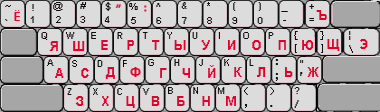
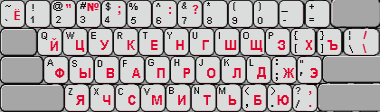
Here's an image of the Rulemak layout:
(generated with carpalx, hacked a bit to cope with non-ascii characters)
Offline