DREYMAR'S BIG BAG of KEYBOARD TRICKS – ÞE OLDE PAGES
The Big Bag has moved! Go find the updatedest and more wonderfuller Big Bag at https://dreymar.colemak.org/ – Now Even Trickier!
Instead of separate platform topics, over there you can select a platform icon and get implementation info in handy context boxes.
Some less central content may not (yet) have been moved though, so if you're missing something make sure to look in both places before you despair.
The XKB/Linux content is not fully present on the new pages, so do read section [4] below for guidance. Just be aware that other content here may be outdated.
DREYMAR'S (XKB): DreymaR's Extensive Yet Modular ARSenal – for X KeyBoarding
There is a Big Bag of Keyboard Tricks Main Topic, in which I go into detail on what the different tricks are.
I also have topics focusing on different implementations of the Big Bag Of Keyboard Tricks:
• The Big Bag (PKL) for Windows (or go straight to the GitHub EPKL repository)
• The Big Bag (XKB) for Linux – you are here!
• The Big Bag (TMK) for programmable "QUICKIE" devices
• The Big Bag (Mac) for Karabinier by mkborregaard
DREYMAR'S BIG BAG OF TRICKS for LINUX/XKB
[1] Character/Key Mapping Layers
[1.1] Colemak[eD] AltGr mappings (lv3–4; dead keys on symbol keys etc)
[1.2] Extend layers using Caps Lock as a switch modifier for navigation/editing/browsing/etc from near the home position
[1.3] Several Dead key enhancements giving access to lots of glyphs (presently for Windows/PKL only)
[2] Ergonomic Key Remappings
[2.1] Angle/Wide ergo modifications to improve wrist angles, hand spacing and right pinky stretch/load effort
[2.2] Colemak-DH alias the Curl(DH) ergo mod (deprioritize middle columns without keys changing fingers)
[2.3] Symbol key mods for the adventurous (better apostrophe and/or hyphen positions)
[2.4] Modifier modness for the adventurous (Sticky, One-shot etc; Work-In-Progress)
[3] Layout Variants
[3.1] Tarmak transitional Colemak layouts for learning Colemak in smaller steps if so desired
[3.2] For several locales, a 'Unified Symbols' layout with only a few necessary changes from standard Colemak[eD]
[3.3] Intuitive Cyrillic, Greek and Hebrew Colemak phonetic layouts to write other scripts (e.g., using a toggle switch key)
[3.4] Mirrored Colemak, allowing one-handed typing without extra learning
[4] Download and Setup
[4.1] Download and Install files for X11 XKB for Linux
[4.2] XKB configuration
[4.3] XKB notes and terms
[–.–] Notes/Done/Todo
An advantage with my implementations is that you can pick and choose most of the enhancements as modules:
• The Angle/Wide mods are keyboard models so they work with any layout you choose (including QWERTY or Dvorak ones) and may be chosen per user
• The Extend layers and their switch key are xkb "options" and should work with nearly any existing layout
• The locale/phonetic, Mirrored and Tarmak layouts are separate layouts that may use various chooser keys as desired.
Freedom of choice through modularity is an ideal in the DreymaR world, as in Linux.
[1] Character/Key Mapping Layers
[1.1] COLEMAK[eD] - EDITION DREYMAR
See the main Colemak[eD] topic if you're interested.
This is my own preferred AltGr mapping layers (modifier lv3-4 in Linux terminology) for the Colemak layout. I've tried to add much functionality while keeping it intuitive. In particular, I want to be able to write different scripts and tech/maths symbols. Since the start, there's been some minor tweaks based on my experience and forum feedback, but it's been stable for a long time now.
See the xkb/symbols/colemak file for comments and explanations, in addition to these design goals:
- Keeping level 1-2 of Colemak intact! This is what I think of as the Colemak layout per se.
- Dead keys easily accessible as unshifted AltGr+symbol keys; common ones in good positions.
- Added letters/quotes allowing many of the major latin scripts to be written correctly.
- Added symbols/glyphs similar to, e.g., Mac ones - allowing common math/tech/etc typing.
- The positions of added letters and symbols should as far as possible be easy to remember!
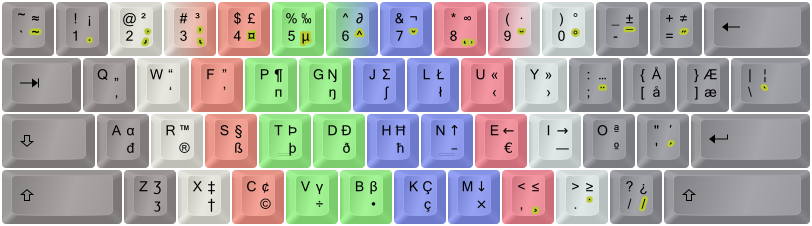
The Colemak [edition DreymaR] layout, using different lv3-4 mappings from Shai's default Colemak.
Shown on an ANSI keyboard with dead key emphasis (golden) and "FingerShui" color-coded proposed fingering.
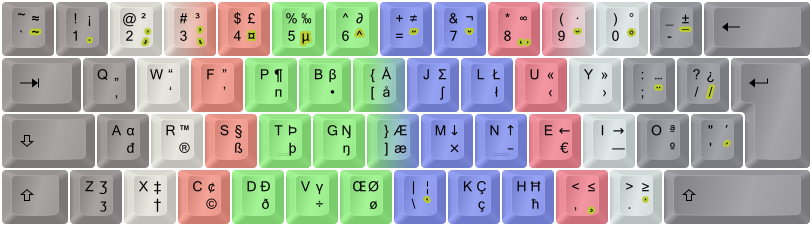
The Colemak-CAW[eD] ergonomic variant shown on an ISO board (see below).
HowTo:
• You can select the various layouts for different locales (see below) that all have my Colemak[eD] mappings, in the standard layout chooser
• I often type 'colemak' or the language name into the search field to narrow down the search
• Alternatively, you may use a 'setxkbmap' terminal command such as 'setxkbmap -layout "us(cmk_ed_us)" -v 9'
• Or see below about my setkb.sh script for changing XKB settings!
[1.2] EXTEND LAYERS
This is My Favorite Mod next to Colemak itself! The ability to navigate and edit from the home position and its immediate surroundings is extremely powerful. It's like having part of the power of advanced editors like Vim ready in all situations. Plus a fully functional multimedia keyboard without sacrificing compactness. And much more.

A symbolic chart of my Extend mappings (lvl1 only). Greens, navigation; blue/circled, mousing; orange, multimedia; gray, system/misc.
If you prefer text, this is from my XKB Extend source file:
The XKB implementation is almost the same as the Windows/EPKL one. You get separate shifted multimedia key mappings which EPKL couldn't support, but not mouse WheelLeft/Right scroll keys as those are generally poorly implemented in Linux. Instead, there's a MouseKeys On/Off key on <LSGT> and a Compose/Multi key on Slash. The Tilde key is customizeable – by default it holds a spare Del but it could be anything you deem useful. Of course, anything is customizeable really! d( ^◇^)b
MouseKeys: Hitting Caps+<LSGT> (or Shift+NumLock if that's enabled) enables/disables Pointer Mousing; when that's on you may move the mouse pointer with the GD<> keys and use BKM for buttons (or you can use the KeyPad keys as before). My mapped keys go a few pixels at a time so when acceleration is on you may travel quickly around the screen this way. Wheel mousing works but doesn't repeat so you'll have to press many times to scroll a long way.
Multimedia keys: These are mapped to the F keys (++) as intended but XKB/Linux doesn't necessarily link any actions to their key presses although these days most of the usual multimedia keys are configured as expected; this is done in the Shortcuts settings which can be accessed in Unity/Gnome via the Keyboard settings (or dconf-editor/gsettings to org.gnome.desktop.wm.keybindings for the Window Manager ones and ??? for other categories). You could also use xbindkeys, AutoKey or others to bind whatever you want to these keys. Using the Settings > Keyboard panel in Unity/Gnome (gnome-control-center keyboard) doesn't work as expected with the Extend mapped keys, since the hotkey will register as a 'Level 5 shift' keypress when you press your Extend key! The trick is to press the modifier(s) before clicking on the shortcut you want to set! Then when 'New accelerator' is showing you press down the final key. I had to do that for the Calculator and Terminal keys (Lv5+<FK12>) as those shortcuts were disabled by default in my Ubuntu install.
Holding down AltGr you get Extend2, a numeric layer laid out pretty much like a standard NumPad but with the top row moved around to fit:

Extend NumPad mappings. Green, navigation; purple, NumPad; sepia, symbols; gray, system/misc.
Here's the XKB file version:
Having to hold down both CapsLock and AltGr while entering numbers is hardly ideal. I'd like to use another key (but there are few to spare) and maybe make it a lock instead of a switch modifier (i.e., one you have to hold down). Unsure about that, really. But at least, here it is. Actually, one might construct a level7 modifier by combining level3 with level5.
If you're cheeky and dexterous enough to press CapsLock+AltGr+Shift at the same time, you're treated to a set of double-arrow symbols of the kind used in mathematical proofs and more (⇖⇑⇗ ⇐⇔⇒ ⇙⇓⇘), laid out like in one of the standard xkb keypad layouts. I thought they might be somewhat handy, but the heavy chording required suits the fact that few need them very often! The single arrows didn't fit in, but at least the four orthogonal ones (←↑↓→) are already there in the lv3-4 Colemak[eD] mappings.
All KeyPad keys are affected by PointerEnable! So if you find the mouse pointer moving around instead of numbers being entered, hit the key to disable pointer mousing (Shift+NumLock or CapsLock+LSGT). Or, you've found an extra way of key mousing! :-)
For more info and tricks, see my Big Bag main and Extend Extra Extreme topics.
HowTo:
To get the Extend mappings to work in xkb, you need two things:
• Set the 'misc:extend' xkbmap option (see below for setup info), and
• choose a modifier key to switch to level5; I've added a 'level5:caps_switch_lock' option to use the Caps key.
• There are others to choose from (lsgt, lalt, lwin and rwin) that were already available in xkb; you could even have more than one if you want!
• (By using several lv5 switch keys, the switch_lock behavior makes it possible to lock the Extend layer by pressing two modifiers together should you require that.)
• If you have the 'Options...' settings menu (Gnome has it), these options are under the 'Miscellaneous' and 'Level 5' headings.
[1.3] ENHANCED DEAD KEY MAPPINGS
For some reason, the Stroke dead key is still broken in my XKB. Gotta get that fixed at some point (maybe it'll be my first Linux bugfix unless someone beats me to it). Furthermore, I'd like to add more mappings that feel intuitive to me such as superscripts on the acute accent key and subscripts on the grave accent key.
Some dead keys are almost empty: The doubleacute only caters for ő ű, and ring only caters for å ů ẘ ẙ. There's also a whole iota dead key that only concerns itself with Greek characters. I'm tempted to stuff something good into those cracks even if it's not an entirely logical thing to do (because the name of the dead key wouldn't reflect these extra mappings). If you use up a key mapping on a dead key it really shouldn't sit there taking up keyboard space for the meager purpose of providing 2-3 glyphs!
I think it's about the locales. The big en_US.UTF-8 Compose file has the dead_stroke key defined (and lots of other goodness!) so I should find out how to get that then. Defining my own ~/.XCompose file apparently involves setting the xim input method as the active one instead of a hard-compiled GTK one my Ubuntu must be using now I guess. It's a bit complex it seems... :o I'll be back on this issue when/if I find out more!
[2] Ergonomic Key Remappings
[2.1] THE ANGLE/WIDE ERGONOMIC KEYBOARD MODEL MODS
These are ergonomic mods, moving some keys around to achieve straight wrists (the Angle mods), as well as better hand separation and right pinky load (the Wide mods). The Angle part is almost a no-brainer to me as it allows the left hand to keep a straight wrist without changing the fingering on ZXCV, and makes B easier to reach. Colemak creator Shai himself has given his "blessing" to this mod! The Wide mod is more optional, but it does put some load off the right-hand pinky, widen the arm distance (useful for small keyboards in particular, but nice regardless), and provide easier access to AltGr/Enter/Backspace/RShift.
For Linux/xkb, the Angle/Wide mods are implemented as keyboard models. This means that you can use them with any layout including the QWERTY and Dvorak ones, Tarmak and even the Curl(DH) mod and Mirrored Colemak, because those are implemented as layouts. Modularity at your fingertips, again.

The AngleWide(Slash) wide ergo mod for PC105/ISO keyboards.
I've implemented the ZXCVB_ 'Angle' shift for ISO keyboards both separately and as part of the AngleWide(Slash) mod that I use myself. For ANSI boards I've made an implementation of the 'Angle(Z)' shift (moving the Z key to the middle) and a Wide(Quote) mod as well as the combination of these. Also the 'A-Wing' mod to get the Angle and right pinky benefits without messing with the Z position (at the cost of longer left pinky stretches), should anyone be interested.

The Angle(Z)Wide ergo mod for PC104/ANSI keyboards
HowTo:
To use these, you might have to edit a file or so (see below under "Installation") unless your distro supports keyboard choice which Ubuntu used to do but doesn't anymore.
Otherwise, 'setxkbmap -model <name>' works on-the-fly. I use my setkb.sh script; see below.
The xkb ergonomic keyboard model mods have names|shortstrings as following (see below for models with Curl):
• pc104angle | 4a – ANSI/US Angle mod, putting Z in the old B position
• pc104wide | 4w - ANSI/US Wide mod, putting the Quote key in the old Right Bracket position
• pc104awide | 4aw - ANSI/US AngleWide mod, combining the two mods above
• pc104awing | 4f - ANSI/US A-Wing mod, splitting the bottom row and shifting the others
• pc105angle | 5a - ISO/Euro Angle mod, putting <LSGT>/VK_102 in the old B position
• pc105wide | 5w - ISO/Euro Wide mod, putting the Slash key in the old RBr position
• pc105awide | 5aw - ISO/Euro AngleWide mod, including Angle-LG and putting the Slash key in the old RBr position
[2.2] COLEMAK-DH ALIAS THE CURL-DH ERGO MOD
The point of the Colemak-DH ergo mod is to make the home "row" curl more like a relaxed hand does instead of forcing it to a straight line as was commonly thought best some years ago. Several typists have felt that the middle-trench D and H positions of Colemak weren't so comfortable and as a result the Workman and Norman and other layouts were made. However, I don't think they succeeded on many other important facets (more keys moved, and/or more same-finger bigrams, and/or poorer performance on other stats). So the proposal by stevep99 to fix the issue based on Colemak and without any keys changing fingers was a stroke of genius! It's a low-cost improvement of the default straight-homerow Colemak. And I still think of it as Colemak because it really is, keeping its good stats for travel distances, finger usage and same-finger ratios.
The Colemak-DH mod depends on using an Angle mod which is easier on an "105-key"/ISO keyboard but there are decent options for "US"/ANSI boards too. If you want to learn this using the Tarmak progression described above, that's possible too! You just have to learn the Angle mod early on, and tweak the 2nd Tarmak step a little.
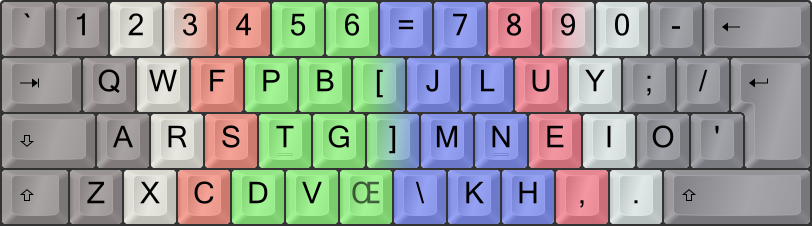
The Colemak Curl(DH)AngleWide, a.k.a. Colemak-CAW, ergo modded layout.
HowTo:
• Note that for now, the Curl(DH) mod isn't 100% modular. You'll get it with the Colemak[eD] mappings for one, as AltGr mappings are entwined with the mod.
• Also, should you wish to switch to another layout such as QWERTY you'll have to deactivate the curl option (`setxkbmap -option ''` works).
• There's a selectable curl-modded layout under English (the 'us' locale):
– us(cmk_ed_dh) – "English (Colemak[eD], Curl-DH ergo)"
• In addition, there's an xkb option you can use with setxkbmap -option.
– misc:cmk_curl_dh
NOTE: This is ideal for most locale layouts, for instance. However, they overwrite and are overwritten by other layouts – even non-Colemak ones!
• If you wish a "harder" solution, you can edit the xkb/symbols/colemak file, uncommenting the mod lines you want.
These are found in the xkb_symbols "cmk_ed_letters" partial, so they affect all locale variants, Tarmak etc. – but not non-Colemak layouts.
• Finally, the setkb.sh script will accept several Curl-modded keyboard models. It'll reinterpret these as a combo of model and misc option, accordingly.
– 4ca(ws) – ANSI/US CurlAngle-Z(Wide-Quote) (Wide and Sym are both optional)
– 4cf – ANSI/US CurlAngleWing(Quote)
– 5ca(ws) – ISO/Euro CurlAngle(Wide-Slash)
– To get the older mod variants (DHk or DvH) you'd have to edit the colemak symbol file, or specify model+option directly.
• Note: If you have a system (X11) directory install, you'll need sudo privileges to edit those files. (Make sure you use gksudo or similar if you start a GUI editor.)
• There are special Tarmak-Curl(DH) layouts; see the Tarmak section below.
• NOTE: If your locale variant remaps any of the affected keys (mainly D, G, H, M or K) you'll have to look up and edit that locale symbols file.
Example: Editing the symbols/colemak file
• Below I've uncommented a line in the "cmk_ed_letters" section of xkb/symbols/colemak, activating both sides of the Curl(DH) mod.
• This is useful for non-US layouts and Tarmak steps; otherwise you can just select the English Curl(DH) layouts as explained above.
//// Activating the line below will "hard" enable the Cmk-DH = Curl(DHm) mod; see below.
//    include "colemak(cmk_ed_dh)"
//// Activating the line below will "hard" enable the old Curl(DHk) mod; see below.
//    include "colemak(cmk_ed_dhk)"
//// This is the old Curl(DvH) Colemak ergo mod, keeping V and M in place.
//    include "colemak(cmk_ed_dvh)"
Example: Using a CurlAngleWide "model" with setkb.sh
• These two examples both activate the PC105-Curl(DH)AngleWide mod.
• The shortstring line will not change the active layout (apart from the Curl mod); the other line will use the setkb.sh default layout.
• This is useful if you don't want to edit the files. Curl affects only the first/main layout, but will mess up any non-Cmk layouts in the GUI.
• To add the Sym mod (see below), use the shortstr "5caws", or the options 'misc:cmk_curl_dh,misc:sym_wide-105' in this case.
$> ./setkb.sh "5caw"
$> ./setkb.sh -m pc105awide -o 'misc:cmk_curl_dh'
Hope that isn't too complex or arcane! It's really a very nice mod I think. ;-)
[2.3] PLAYING WITH THE SYMS
• The "Sym" symbol key mod is implemented in the xkb/symbols/symkeys file.
• It's not a hard (keyboard model) mod, but selected as an option; this is because it should not affect hard mappings like Extend layers.
• You may choose between non-Wide, Wide-ISO and Wide-ANSI variants.
  \   7   8   9   0   =
[   j   l   u   y   '   -
 ]   h   n   e   i   o   ;
   /   k   m   ,   .   _____
The "Sym" symbol rotation mod, shown with the Wide(ISO) mod. Apostrophe and hyphen get better positions.
HowTo:
• Appending an 's' to the setkb.sh shortstring will activate the appropriate Sym mod for your configuration, as an xkb option.
• In addition, you can can use `setxkbmap -option` as with the Curl mod:
– misc:sym_non-wide (if you don't use a Wide mod)
– misc:sym_wide-104 (if you use the Wide(Qu) mod for ANSI boards)
– misc:sym_wide-105 (if you use the Wide(Sl) mod for ISO boards)
• See the Curl section above for more info on setting layout mod options.
[2.4] MODIFIER MODNESS (Work-In-Progress)
We've already encountered a modfied modifier above: The Extend key, which is usually the mostly unused CapsLock being put to far better use. In "vanilla" Colemak, this key is modded to a second Backspace.
In the Linux world, it's quite common to shuffle around the modifiers a bit. Caps can become Control, Esc or something else for instance.
Further modifier modifications is still pretty much a work in progress in my Big Bag.
[3] Layout Variants
[3.1] THE TARMAK TRANSITIONAL COLEMAK LAYOUTS
There's a main Tarmak topic that you may want to read. Basically, four Tarmak layouts provide stepping stones from standard QWERTY to Colemak[eD] by moving only 3-4 keys per step. Each step brings at least one important key to the home row (notably, E-T-R-O-I) and only the rare J key is misplaced in the process.

The 5-step Tarmak (transitional Colemak) layouts, spectrally color-coded from red (Tarmak#1) to violet (Colemak).
My xkb Tarmak files are all based on my standard Colemak[eD](US English) layout with no options for other lv3-4 mappings. They are learning aids anyway, so this shouldn't be much of a problem.
HowTo:
• Entering "Tarmak" in the search field in the layout chooser should show the four Tarmak layouts from E (the first) to ETRO (the last step before Colemak)
• Using command line or default file, they're called:
us(tarmak1__e) – "English (Tarmak1 - Colemak[eD] transitional)"
us(tarmak2__et) – "English (Tarmak2 - Colemak[eD] transitional)"
us(tarmak3__etr) – "English (Tarmak3 - Colemak[eD] transitional)"
us(tarmak4__etro) – "English (Tarmak4 - Colemak[eD] transitional)"
• Also, there are some special Tarmak steps for learning Colemak with CurlAngle mods:
us(tarmak1c_e) – "English (Tarmak1h - Colemak[eD] transitional w/ Curl-H mod)"
us(tarmak2c_et) – "English (Tarmak2dh - Colemak[eD] transitional w/ Curl-DH mod)"
• (For the old DHm mod, the first Tarmak step can be learnt without any modification, but you may learn the Angle mod first and should learn it by step 2.)
• Tarmak step 3–4 can be combined with Curl by activating a Curl mod through the misc options or editing the symbols file containing your layout.
[3.2] LOCALE COLEMAK[eD] VARIANTS
See my Locale Variants forum topic for the various locale solutions.
I took off a bit and made quite a bunch of these, heh! I can make more on request. It'd be nice with feedback from local users as some design decisions are open to debate and depend on actual usage as well as personal preferences.
Here's what I've covered so far, for the most part both with conservative 'keep local symbols' and my preferred 'unified symbols' variants
(On a side note, there were only 11 Dvorak layouts in the xkb files last time I looked!):
al at ba be bg br ca cz de dk es fi fr gb gr hr hu il is it latam nl no pl pt ro rs ru se si tr us
- The brackets (lvl3-4) and the LSGT key may hold the most common locale-specific keys.
• The oe/aring special letters may well be replaced; these should also be on dead keys.
• Furthermore, keys with non-essential mappings (H J K L) are up for grabs if need be.
• See the colemak_template symbols file for more info on local Colemak[eD] variants.

The Colemak [edition DreymaR] layout, Norwegian+Danish 'Unified Symbols' variant; mostly like the standard Colemak[eD].

The Colemak [edition DreymaR] layout, Norwegian 'Keep Local Symbols' variant (symbols like local key markings).
Please note: The 'Local Symbols' variant for a locale uses symbol mappings from the default locale layout (usually a QWERTY one), which are also the ones normally found on physical key markings on keyboards made for that locale. The letter block, however, is the Colemak[eD] one which may lead to some inconsistencies or faults in lv3-4 mappings. For the most consistent and complete set of AltGr mappings, use the 'Unified Symbols' variants.
HowTo:
• You can select any layout from the normal layout chooser – enter your language in the search field to narrow it down. There are two types:
• "Unified symbols" (cmk_ed_us) layouts, using the US-like symbol mappings that I recommend; these give the full Colemak[eD] experience
• "Keep local symbols" (cmk_ed_ks) layouts, if you don't want to change the symbol mappings from your locale but just the letter keys (and semicolon)
• Using command line or default file, the Cmk[eD] layouts are called 'lc:cmk_ed_us' and 'lc:cmk_ed_ks', where 'lc' is the locale code ('se' for Swedish for instance)
[3.3] PHONETIC COLEMAK LAYOUTS FOR NON-LATIN SCRIPTS
See the phonetic subtopic of my Locale topic for more info on these layouts.
For the Greek and Hebrew phonetic variants I mostly moved the keys of their default phonetic xkb layouts to a Colemak setup, hardly changing anything else. Ideally, I should be able to define phonetic names for the keys corresponding to Colemak so that other 'phonetic' layouts would work automatically, but I think the XKB way of doing that may be too QWERTY-centric for that to work right now. For Kyrillic, I've used Ghen's excellent Rulemak which under my xkb patch is found under 'Russian (Colemak, phonetic E-Slavic)'. It isn't for Russians only, but that's how xkb likes to sort things. Similarly, for South Slavic there's the Bulgarian (Colemak, phonetic S-Slavic) variant now. Let me know how that works out, please?

The Colemak phonetic layout for Greek, simply moving around the keys of the default (here xkb) Greek layout.
HowTo:
• You can select any layout from the normal layout chooser – enter your language in the search field to narrow it down.
• The non-latin script variants are called "<Language> (Colemak, phonetic)"
• Using command line or default file, the phonetic layouts are called 'ru:colemak', 'bg:colemak', 'gr:colemak' and 'il:colemak'
[3.4] MIRRORED COLEMAK
Advanced typing is possible with only one hand given a mimimum of training with the mirroring method. In fact, this paragraph was written entirely using the left hand with the exception of the mirroring key itself, with hardly any training! The brain is inherently good at mirroring things.
You'll want an easily accessible key (such as a thumb key) to switch between normal and mirrored typing. One suggestion is using LAlt for left-handed typing, and RAlt or RWin for right-handed typing. But you may instead use a foot switch set to any other key (maybe an out-of-the-way one like ScrollLock), or a "ghetto foot switch" made by stripping most keys off a keyboard and placing it on the floor. A more fancy but still cheap foot switch could be made by soldering the wires from a foot pedal switch (if you have something useable) to the contacts of a key on a cheap keyboard.
On XKB: Using a Group setup, add the mirrored Colemak[eD] as your next layout group.
Then you may choose between a slew of "key(s) to change layout (while pressed)" options!
This does compromise your group options a bit (if you need to use non-latin layouts etc).
If that bothers you, consider using both 'next' and 'last' layout groups with chooser keys.
Use Ubuntu: 'Keyboard Layout'->'Options'->'key(s) to change layout (while pressed)'.

The Mirrored Colemak layout, which should be good for right-handed typing. The Angle mod is recommended for this.
(The Mirrored Colemak layout with the AngleWide(Slash) mod is better for left-handed typing I think.)
HowTo:
• This is only for English(US) – if you want something else you'll have to edit it in yourself.
• You can choose it in the normal language chooser; it's called "English (Colemak[eD], mirrored)"
• Using command line or default file, the layout is called 'us:cmk_ed_mirror'
• AngleWide is chosen separately, as a keyboard model (see above)
[4] Download and Setup
[4.1] DOWNLOAD AND INSTALL
This section tells you how to get and run my Linux/xkb mod files. The next section is about running setxkbmap to configure the layout choices. There are also specific HowTo instructions at the end of each mod section above.
• It's a good idea to have a standard-layout keyboard hooked up for this, for typing in commands before you're set up with your layout and model.
• For the files themselves you'll only need a computer with X.Org X11 (that is, almost any Linux distro); my files modify its xkb keyboard component.
• To use my scripts, you'll need BASH (BourneAgainSHell). Most distros have that now, but if you don't then the command sudo apt-get install bash will get it.
• NOTE: Running setxkbmap on a local directory is a bit tricky. If it cannot activate your layout, use a system install (-o) instead. I'll take a look at it.
• (The '-d' and '-t' options are only used if your mod dir has an odd path/name. If you're using my files as they came, you won't need to set those.)
Copying my xkb files:
Here's my GitHub BigBag XKB repository with original and changed files for what should be one of the latest XKB versions. They should actually be just fine for almost any version since the changes in the X versions I've seen have all been superficial and minor. The zip archive also contains the install script, some tools like the setkb.sh script that activates a chosen layout using the setxkbmap command, and images of the locale layouts (in the doc folder).
Copying the changed files over the X11 ones (after backing up the old ones) should be simple and safe enough. This should give you the further option of installing to the X11 system directory so the changes show up in settings GUIs and such, or instead installing to an entirely different place of your choice and running the setxkbmap command pointing to that directory instead! However, we can't get the local setxkbmap to work at the moment so I guess we're stuck with system install for now. Note that you can't use the provided xkb files alone with setxkbmap as they aren't a complete xkb directory! You should use my install script to copy/install locally first. And make sure you have write privileges to the desired path.
I've made a script (install-dreymar-xmod.sh) that takes care of business. Using various command line switches (call it with '-?' for instructions and defaults), it can backup, restore, install to a chosen directory or install to the system directory (with the '-o' switch). It can link to my setkb.sh script to activate the new setup, and run a script to install GTK bindings for the Cut/Copy/Paste keys (but those didn't work anymore in the latest Ubuntu so I replaced them with actual Ctrl+X/C/V entries in the Extend mappings).
There are various ways of making your xkb setup persistently activated. I prefer writing a line in your ~/.bashrc file (or whatever rc file is sourced on your startup) running the system setxkbmap command. My setkb.sh script can do that with the -a switch.
NOTE: You must use 'bash <script> -<options>' (or './<script> -<options>' with run privileges for the .sh file), not the 'sh' command!
(To get run privileges for the .sh scripts in my directory, run the command chmod +x *.sh in the BigBag directory.)
NOTE: You can get the xkb directory back to its original state by reinstalling the xkb-data package (e.g., 'sudo apt-get install xkb-data').
ShortString syntax:
My setkb.sh script may be called with -m(odel), -l(ayout) and -o(ptions) switches that let you specify what to activate, but for the model/layout combo I have a simpler way. Adding a 1–3 part short string to the install or setkb script will select a model/layout as following:
  SetXKB.sh [<kbd> [<loc> <sym]] ShortStr syntax:
  ===============================================
  <kbd> 4/5   - ANSI-104/ISO-105 keyboard model, then...\n"\
        n/a/c - Normal/Angle/Curl-DH, and optionally...\n"\
        w/f   - Wide/A-Wing (a.k.a. 'A-Frame'), and...\n"\
        s     - Sym\n"\
  <loc> Two-letter locale layout code like 'us' for USA, 'gb' for UK etc\n"\
  <sym> 'us'/'ks' for 'Universal' or 'Keep Locale' symbol variants\n\n"\

  Examples: '5a    se us': Angle-ISO, Swedish Cmk[eD] 'UnifiedSym'\n"\
            '4ca   gb ks': Curl(DH)Angle-ANSI, Eng.(UK) Cmk[eD] 'KeepSym'\n"\
            '5caws': Curl(DH)AngleWideSym-ISO, keep current layout/variant\n"
Point-by-point example: System install for Debian/Ubuntu and many other distros:
1. Download/unzip/clone the BigBagKbdTrixXKB dir to, say, your home desktop (~/Desktop)
2. Open a terminal window and go there, e.g.: cd ~/Desktop/BigBagKbdTrixXKB
3. Make the scripts executable with chmod +x *.sh
4. To install/activate: sudo bash ./install-dreymar-xmod.sh -ox.
5. See XKB Configuration step below and edit /etc/default/keyboard to make startup changes persistent
6. Reboot the system (to be on the safe side; may not be necessary)
7. Select your layout such as English(Colemak[Ed], Curl-DH ergo) from dropdown top-right menu (Ubuntu) or settings → keyboard
Install script usage example: System install
• Force install to the system X11/xkb directory with '-o' (changes will show up in the system settings GUI)
• (You may get asked for your sudo password, but you don't have to run the script with admin rights)
• Just activate the default layout ('5caws us us') with '-x'; this may be necessary to get Angle/Wide as models aren't GUI selectable
• (A backup of the xkb dir will automatically be made if no previous backup is found in the system X11 dir; to force a fresh one use '-b')
$> bash install-dreymar-xmod.sh -oxInstall script usage example: Restore
• Restore the oldest backup with '-r 1'
• (To get a newer one, use a higher number; may well be too high if you wish to ensure the latest backup)
$> ./install-dreymar-xmod.sh -r 1Setup script usage example: Change model/layout with shortstrings, and write to file
• For activating a single layout and model, we use a -s 'model locale eD-variant' shortstring
• Activate Curl(DH)+PC105-AngleWide ergo mod (implemented as model+option).
• Activate a French "UniSym" Cmk[eD] layout instead of the default US one.
• Append the resulting setxkbmap command to your ~/.bashrc file with '-a' so it gets activated on each logon.
$> ./setkb.sh -a "5caw fr us"(NB: If local-dir setxkbmap works for you!?) Install script usage example: Local default install
• Install in the default location (safe, under your home directory, but inaccessible to the GUI)
• Run setxkbmap too, activating the Croatian "Keep Local Symbols" Colemak[eD] layout
• Also, activate the WideAngle ISO board model ('pc105awide')
• Since no system files are affected, force no backup with '-n'
$> bash install-dreymar-xmod.sh -n "5aw hr ks"(NB: See above!) Install/setkb script usage example: Local install to a specified path, then activate it manually, also adding a line to ~/.bashrc.
• Run my install script with the '-i <path>' switch; here, I use '~/myxkb'
• Run setxkbmap from the specified directory using 'setkb.sh -d <path>'; also write the command to the ~/.bashrc file using '-a'
• Activate a "vanilla" ANSI/US non-ergo-modded US Colemak[eD] (use two 'us': One for US(A) and one for "Universal Symbols" – the only US layout)
$> ./install-dreymar-xmod.sh -ni '~/myxkb'
$> ./setkb.sh -ad  '~/myxkb/dxkb' 4n us us
[4.2] XKB CONFIGURATION
Linux GUI settings:
The Big Bag for XKB is installed as xkb-data files, and normally activated using either a GUI settings interface or the setxkbmap command – which may be run through my setkb.sh script. Now, some systems like Wayland use the xkb-data files but don't have a X server as such so there is no setxkbmap command. For these, the files still work but other ways of selecting your layout must be used. See the new BigBag pages and the BigBagXKB repo docs for more info.
On Ubuntu using Gnome (and what else?): If you go to the Layout settings, hit '+' to add a layout and type in 'Colemak' you should see a bunch of additions. The Extend option is found under Options -> Miscellaneous Compatibility Options, and you should choose an appropriate lv5 switch for it (I've added a Caps Lock option). If you can't find it, your distro may not have those options visible in the Settings GUI and you may have to do it the command-line, dconf-editor and/or config file way.
The available Angle/Wide ergonomic mods are the Euro/ISO/PC-105 board ZXCVB> shift (named 'pc105angle'), the Angle/Wide-Slash mod described above ('pc105awide') as well as the US/ANSI/PC-104 board ZXCVB shift ('pc104angle') and Wide(Quote) mod ('pc104wide'). Unfortunately, the current Ubuntu versions have lost the GUI Settings option to switch keyboard models – which I find very odd.
Using my setkb script:
As seen above, I have a little script that activates layouts and options, allowing a shortstring notation to keep things compact. It's essentially just a wrapper for the setxkbmap command described below. To get more info on it, run it with -h for help or have a peek inside the script!
The shortstring format can be handy if you want to change layouts by hand. If not, just don't bother too much with it. A setkb shortstring consists of:
• KbdModel, such as '4n' for an unmodded PC104(ANSI) keyboard, '4a' for the Angle-Z mod or '5caws' for the ISO-CurlAngleWideSym mod.
• Locale, such as 'us' for USA, 'gb' for Great Britain, 'no' for Norway etc.
• SymVariant: It's 'us' for the main Cmk[eD] "Unified Symbols" variants, or 'ks' to "Keep Local Symbols".
• (Sorry, but there's no way to set/reset other XKB options with shortstrings as I feel that'd get too complex.)
Using the setxkbmap command:
Start a terminal window and use the setxkbmap command to change your keyboard model, like this:
$> setxkbmap -model pc105awide -v 9(The '-v 9' is shorthand for '-query -verbose 9' which outputs useful info. You can run setxkbmap with only the '-v 9' switch if you wish.)
In my download archive there's a couple of shell scripts that do this for you.
If you have a non-PC104/PC105-compatible keyboard you might have to do it differently; let me know if you run into trouble.
The setxkbmap command can do more - particularly useful for, e.g., non-Gnome distros or if you like the command line:
$> setxkbmap -model pc105awide -layout us,no -variant cmk_ed_us,cmk_ed_us \
  -option lv5:caps_switch_lock,misc:extend -v 9
The above example sets up an AngleWide-Slash keyboard with the standard Colemak[eD] layout for US and Norway (both using 'us' unified variants), Extend mode active and Caps as the Extend key. Thanks to Kruppe for this tip! :)
You may include the variants in parentheses, and if you only set the layouts you may omit the switch (see 'setxkbmap -help' for more info):
$> setxkbmap "us(cmk_ed_us),us(cmk_ed_mirror),fr(cmk_ed_ks),gr(colemak)" -v 9(This time setting mirrored Colemak[eD] as the 2nd, French "keep local symbols" as the 3rd and Greek phonetic Colemak as the 4th layout)
Editing the /etc/default/keyboard file:
To make the change persistent between startups, sudo edit the /etc/default/keyboard file. Let's say we want to set up, say, an AngleWide mod, US English Colemak[eD] with group switch to Greek Colemak and an Extend layer with Caps switch (plus standard options like putting Compose on the Menu key and switching groups with both Shift keys):
#XKBMODEL="pc105"
XKBMODEL="pc105awide"
XKBLAYOUT="us,gr"
XKBVARIANT="cmk_ed_us,colemak"
XKBOPTIONS="lv5:caps_switch_lock,misc:extend,compose:menu,grp:shifts_toggle"
Remember that this would need a reboot (or at least 'pkill X' or a trigger command to udevadm?) to kick in. Hope it works for you!
I prefer to just put the setkb.sh script to write a line to a file that's sourced on startup like ~/.bashrc, ~/.xinitrc or ~/.xsession so the layout gets activated persistently.
On Wayland:
As mentioned, there isn't a setxkbmap command on Wayland so the setkb.sh script won't currently work there. I haven't tried it myself, but I've been told this should work.
Add the following to your sway config file at ~/.config/sway/config:
input * {
  xkb_model pc105
  xkb_layout us
  xkb_variant cmk_ed_us
  xkb_options lv5:caps_switch_lock,misc:extend,compose:menu
}
Select model/layout/variant as described above, and any options you like to include.
[4.3] XKB NOTES AND TERMS
The XKB component is a quite powerful system for keyboard definitions, but it's very confusing and complex. I realize that many are unfamiliar with the terms of this trade and, basically, what the hell I've been talking about at all this length! :-)
So, let's explain a little. XKB, a.k.a. the X Keyboard Extension, is a part of the X Service which in Linux provides graphics and Input/Output capabilities for the Windows Manager to provide your user interface with. There are guides to XKB that explain this in more detail; whenever I'm confused I often start with ArchWiki which is a thorough and reliable resource.
Some terms you'll encounter around XKB:
• Model: What type of keyboard hardware you have.
– There's many of these, but in fact most people in the West use the pc104 (ANSI) or pc105 (ISO) models.
– I've piggybacked on the model definitions to create ergo mods in which keys are moved to better positions
– Among these are the Angle mods for a better left-hand wrist angle, and the Wide mods for finger balance and hand separation
• Layout: What key layout you use. This includes QWERTY alternatives such as Dvorak or Colemak, but also locales such as US, UK, Sweden etc.
– The list of locales I've made Colemak[eD] options for is long now! It's found above.
• Variant: Each locale may have several variant layouts, like the plain US vs US International ones. Or variants for ethnic groups in a locale.
– I have two Colemak[eD] variants of each locale:
– The "Unified Symbols" ("us") variants are my full locale layouts, providing symbols and dead keys aplenty optimized for the locale
– The "Keep Local Symbols" ("ks") variants are for those who want the same symbols as shown on their key faces; these are more limited
• Options: This is other settings, like whether you want to remap your CapsLock key to a Backspace or something.
– If you have a proper GUI keyboard setting panel, the options should show up with descriptions; otherwise, it can be a bit mystical
– I use options like "misc:extend,lv5:caps_switch_lock" to activate my Extend mappings and make CapsLock an Extend shift
– Another option I like is "grp:shifts_toggle" which lets you switch layout groups (see below) with both Shift keys
– Also, "compose:menu" which makes the Menu key (lower right on full keyboards, sometimes missing on laptops) a Linux Compose key
• Group: You can have several layout/variant sets loaded, and switch between them with menus or shortkeys.
– This lets me keep a phonetic Greek Colemak layout on group 2 so I can switch to it easily
– Also, using mirrored Colemak is easy if you set it as your group 2 layout with a convenient group switch key
• Rules: This is the component that unites and presents the other files; it's used to generate menu choices in the GUI and options for setxkbmap for instance
NOTES:
• After the files have been modified, a restart may be needed.
– In my install script I used to have a 'trigger' command to udevadm to take care of business.
– However, that felt unsafe so I'm not doing it by default anymore.
• You may also have to clean out the XKB server cache (/var/lib/xkb/server*.xkm) manually if you didn't use my script (requires admin privileges).
• If a layout isn't the first in the list in Linux, some programs may cause problems (Alt key not working as it should in Emacs for instance)! This is a known but annoying bug.
• Beware of file ownership issues (don't use 'gksu nautilus' but 'gksudo nautilus' for instance!) as they can break your OS GUI!
The xkb server can get its settings from several places so how your actual settings are determined may be a little confusing! It depends on whether you have Gnome, Unity, XFCE or something else but often the Gnome settings are present. This is what I think I know:
- If a compiled X server file is cached (/var/lib/xkb/server*.xkm), that usually takes presedence (until the udev settings are triggered?)
- The /etc/default/keyboard file should be read at startup to get default keyboard settings; I'm not sure when that happens though (due to the above?)
- The gnome settings ('gsettings list-recursively org.gnome.libgnomekbd.keyboard', or use 'dconf-editor') are important. They can also get messed up...
- (Did these settings use to reside in org.gnome.desktop.input-sources; do they still in some configurations?)
- The root windows has x properties ('xprop -root | grep XKB'). These reflect changes from the default file and setxkbmap.
- The setxkbmap command (see below) can override the above on a per-session basis; you can put it in a startup script if you wish.
- Sometimes on Debian I've experienced trouble with finding the server*.xkm file, and the Gnome settings conflicting with setxkbmap(?). Crashes have occurred.
DONE:
• Made the Extend layer modifiers (A/S/T for Alt/Shift/Ctrl) work with the other keys like they do in my EPKL implementation under Windows
• Extend Undo/Cut/Copy/Paste, navigation and F-keys work as they should, as does Wheel Scrolling
• Reviewed the Curl mod solution: Keyboard models are reserved for Angle/Wide mods. This leads to the Curl Extend layer not having Paste on Ext+V.
• Curl(DH) mods implemented as Options in addition to the US layouts (a bit strange, as they'd mess up non-Colemak layouts, but very useful)
• More locale variants: al hu ro tr, ba/hr/rs/si...
• Updates to the install and setkb scripts. Clearer output, and setkb now supports model-only shortstrings and Curl(DH) "models" (see script -h)
• Updated Curl(DH) and added Sym mods, as xkb options.
TODO:
• Something seems to break key repetition after a while in Ubuntu?!? Not sure it's my fault but...
• Dead keys need fixing (slash/stroke, currency, IPA, super/subscripts etc)
• Dead keys with currency on AltGr+4, Greek on AltGr+5, tech/math stuff on AltGr+= and IPA++ on AltGr+Shift+numbers(?)
• Make "phonetic" key aliases work for Colemak: Is there something wrong with the XKB (too QWERTY-centric?) or just my way of using it?
• A level7 modifier (i.e., both level5 and AltGr) in compat for use with the second Extend layer? (AltGr+Caps?)
• A solution for sticky Shift?! It's been suggested that it's a much better way of using modifiers than the traditional chording.
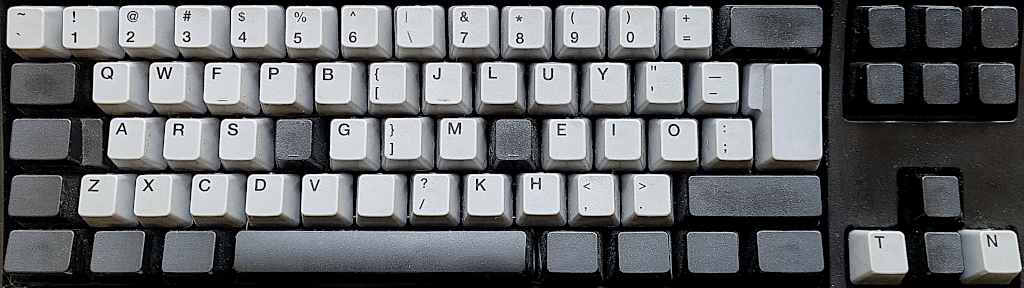
My Unicomp SpaceSaver Buckling Spring (IBM Model M ISO type) keyboard with "American/Ninja" caps, splendidly sporting the Colemak-CAWS layout.
*** Learn Colemak in 2–5 steps with Tarmak! ***
*** Check out my Big Bag of Keyboard Tricks for Win/Linux/TMK... ***