DREYMAR'S BIG BAG of KEYBOARD TRICKS – ÞE OLDE PAGES
The Big Bag has moved! Go find the updated and more wonderfuller Big Bag at https://dreymar.colemak.org/ – Now Even Trickier!
Instead of separate platform topics, over there you can select a platform icon and get implementation info in handy context boxes.
Some less central content may not (yet) have been moved though, so if you're missing something make sure to look in both places before you despair.

DREYMAR'S (PKL/Win): DreymaR's Extensive Yet Modular ARSenal – for Portable Keyboard Layout on Windows
There is a Big Bag of Keyboard Tricks Main Topic, in which I go into detail on what the different tricks are.
I also have topics focusing on different implementations of the Big Bag Of Keyboard Tricks:
• The Big Bag (PKL) for Windows – you are here!
• The Big Bag (XKB) for Linux
• The Big Bag (TMK) for programmable "QUICKIE" devices
• The Big Bag (Mac) for Karabinier by mkborregaard
DREYMAR'S BIG BAG OF TRICKS for WINDOWS WITH (E)PKL
WARNING - Some Assembly May Be Required (if you want a specific locale/ergo variant for instance)
[1] Character/Key Mapping Layers
[1.1] My Colemak[eD] AltGr mappings (lv3–4; dead keys on symbol keys etc)
[1.2] An Extend layer using Caps Lock as a switch modifier for navigation/editing/browsing/etc from near the home position
[1.3] Several Dead key enhancements giving access to lots of glyphs (presently for Windows/PKL only)
[2] Ergonomic Key Remappings
[2.1] Angle/Wide ergo modifications to improve wrist angles, hand spacing and right pinky stretch/load effort
[2.2] Colemak-DH alias the Curl(DH) ergo mod (deprioritize middle columns without keys changing fingers)
[2.3] Symbol key mods for the adventurous (better apostrophe and/or hyphen positions; Work-In-Progress)
[2.4] Modifier modness for the adventurous (Sticky, One-shot etc; Work-In-Progress)
[3] Layout Variants
[3.1] Tarmak transitional Colemak layouts for learning Colemak in smaller steps if so desired
[3.2] For several locales/scripts:
• A 'Unified Symbols' layout with only a few necessary changes from standard Colemak[eD]
• Also, a layout to 'Keep Local Symbols' like their default (QWERTY-type) counterparts and key cap markings for that locale
• Intuitive Colemak phonetic layouts to write other scripts like Cyrillic, Greek and Hebrew (e.g., using a toggle switch key)
[3.3] Mirrored Colemak that allows one-handed typing without extra learning
[4] Download and Setup
[4.1] Download and Install files for PortableKeyboardLayout (PKL) for Windows
[4.2] PKL Tips and Tricks
[–.–] Done/Todo
I've implemented my Big Bag for Windows using Farkas Máté's Portable Keyboard Layout app. In my Github EPKL repository you'll find not only the Big Bag tricks but a whole new version of PKL called EPKL where the E is a bit mystical but it can stand for "EPiKaL" (my version used to be called PKL[eD] meaning "PKL, edition DreymaR"). It adds to the already good functionality of PKL in many ways. See the Downloads section below.
In EPKL, each layout variant (a combo of layout type, keyboard type, ergo mods and locale specific mappings) from plain Colemak to your favourite locale variant of Colemak-CAW[eD](!) uses its own folder with at least a layout.ini file in it and usually at least some state images for the on-screen help image. In the old PKL all dead key and Extend images and whatnot would be there too, but these may also be elsewhere now.
In the main EPKL layout settings .ini file you can select one or more of those folders as your active layout(s) – if you wish, by setting shortcut switches for model/ergo/locale variants. The [eD] layouts contain full AltGr mappings and dead keys. If you have simpler needs and don't wish to use the Right Alt key to produce all these wonderful symbols, there are also VirtualKey (VK) layouts that only move keys around without adding anything to them.
EPKL has separate help images for each shift state and dead key (which is quite a lot of images as there are 19 different dead keys!) as well as for Extend, that activate when you need them. You can set your own hotkey to show/hide these, or use the default Ctrl+Shift+1. The help image will jump around your screen if you mouse over it, trying to stay out of the way.
Due to the non-modular nature of EPKL and the plethora of possibilities, not all locale/ergo combinations are premade. EPKL makes it easier than it used to be though! There's a tutorial in the repository README.
PKL[eD] was tested by Viper who is likely the world's fastest Colemak typist these days, and according to him it works without trouble at typing speeds of at least 150 WPM, probably 200+ WPM!
[1] Character/Key Mapping Layers
[1.1] COLEMAK[eD] - EDITION DREYMAR
As described in the main Big Bag topic, the Colemak[eD] AltGr mappings have been implemented similarly for various platforms. Although the underlying technology varies, they should work almost the same for XKB and EPKL for instance. For some locale variants in particular, you may have to add your own or ask me for help.
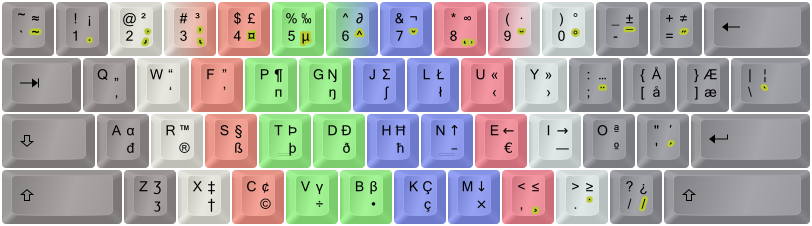
The Colemak [edition DreymaR] layout, using different lv3-4 mappings from Shai's default Colemak.
Shown on an ANSI keyboard with dead key emphasis (golden) and "FingerShui" color-coded proposed fingering.
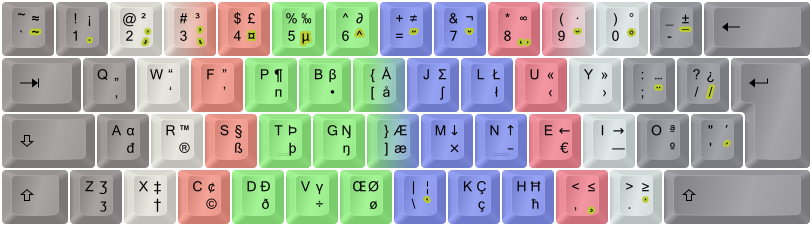
The Colemak-CAW[eD] ergonomic variant, shown on an ISO board (see below).
[1.2] EXTEND LAYERS
The Extend mappings using CapsLock (or another key of your choice) as a modifier for all sorts of cool and powerful key/mapping combos, originated with Autohotkey and PKL. I'm very happy with it and consider it a Life Hack on par with Colemak itself! This is one heavy reason I want a EPKL implementation of my layout on any Windows PC I work on instead of settling for just a plain Colemak install without the power of Extend.
Again: Extend is My Favorite Mod next to Colemak itself! For a lot more info and tricks, see my Extend Extra Extreme topic.

My Extend Nav/Edit mappings. Green, navigation; blue, mousing; orange, multimedia; gray, system/misc.
A more explicitly labeled chart, and an ASCII one from my Extend .ini file:

EPKL has a richly functional Extend implementation. It includes sideways wheel scrolling which the Linux version lacks (it has mousing on/off and a Multi key instead). WheelLeft is mapped to the ISO VK_102 key, so if ANSI board users want it they'll have to put it elsewhere. One might forgo one Esc key and put WheelLeft/Right on the bracket keys for instance.
On the Tilde key I put a handy mouse homing key as a default. It's handy for retrieving or putting away your mouse cursor, or for accessing buttons and menus at the upper-left corner of your current window without touching the actual mouse. Another suggestion is Win+T which is quite convenient for opening the Taskbar which can then be navigated further with Extend-keys. Or whatever you like, of course. :-)
The Extend key is specified in the layout.ini file. To not use it, set its value to 'disabled' – but you'd be missing out big time!
Multi-Extend is available in EPKL: You can set up to two modifiers in the Settings file, which select other Extend layers if held when pressing the Extend key. That layer is then maintained by just holding the Extend key down. Only the first two layers are filled in for now, but you may put whatever you want in there. I put some string examples into Ext3/4 as illustrations. Definitions are found in the Extend File specified in the layout.ini file. Here are the current defaults; they're easily changeable:
    Mod     Layer   Default
============================
    ---     Ext1    Nav/Edit
     1      Ext2    NumPad
     2      Ext3    Strings
1+2 Ext4 Coding 
My Extend2 NumPad mappings. Green, navigation; purple, NumPad; sepia, symbols; gray, system/misc.
I've put string templates including a set of kaomoji text faces in the Extend3 layer:

My kaomoji Extend3 layer, mnemonically arranged (shown here for Colemak ISO-Angle).
Autohotkey code With the * prefix an entry uses the Autohotkey format which lets you mix literal strings with keys. You can for instance write a set of html brackets then position the cursor between them, write then select text and more. See the extend file for examples.
One-shot Extend layers is possible through the 'extReturnTo' setting in your Extend .ini file. When an entry is sent from, say, layer 4, EPKL can return to any specified Extend layer. So if you have text strings in that layer you'll be back in editing mode after sending a string, without having to do anything.
Soft vs Hard Extend layers: In the extend file you can specify which layers are "hard" or positional and shouldn't change between, say, Colemak and Dvorak but only with positional mods like Angle/Wide. A "soft" layer like the strings/kaomoji one is mnemonic and mappings follow letter positions. L is for Lenny. ( ͡° ͜ʖ ͡°)
Tap-Extend is another new Extend functionality. You can set an "Extend Taps" entry with standard Extend syntax; so for instance Backspace will send the Back key. The "Extend time" setting defines a time in ms within which you can release the Extend key and have the entry sent. After this or if you press another key in the meantime, it works as the Extend modifier key like before. Set the time to 0 to disable Tap-Extend.
[1.3] ENHANCED DEAD KEY MAPPINGS
This is one area where EPKL has one up on the other implementations for now! There's a fully functional set of dead keys with my own mappings enhancing them beyond pure accents. There are help images that pop up when a dead key is hit, useful for showing many of the rich possibilities but dead key combinations can produce even more!
There are 19 dead keys in my Colemak[eD] layout now. The common accents are there, together with a currency dead key on AltGr+4 and a Greek phonetic dead key on AltGr+5. Furthermore, some sparsely populated dead keys have been enhanced with extra content, such as superscripts/subscripts on Acute/Grave, fractions and negations on Stroke/Bar and ring symbols plus ligatures on RingAbove. The most extensively reworked key is DoubleAcute which used to have only Uu and Oo and now contains a fairly rich set of math/science symbols (think of the double acute as akin to the equals and prime signs)! You really have to see them to believe them – I'll showcase some below but you can see more using the PKL help images (default Ctrl+Shift+1):
01) Dot below
02) Hook, palatal hook
03) Horn, retroflex hook/tail
04) Currency:


05) Greek (phonetic):


06) Circumflex
07) Caron
08) Ogonek, comma below
09) Breve
10) Ring above, ring symbols, ligatures
11) Macron
12) Double-acute, math/science:


13) Umlaut/diaeresis
14) Tilde
15) Acute, superscripts


16) Grave, subscripts
17) Cedilla
18) Dot above
19) Stroke/bar, fractions


Note that the dead keys interact in clever ways: Ring then 'angle' will produce 'arced angle', Tilde with 'equals' will produce 'equal or approximately equal', Stroke with many symbols will produce slashed symbols (e.g., from 'identical to' you get 'not identical to') etc. The sequence you press the dead keys in will usually matter: Start with the modifier(s) (such as dead_stroke for "not") then the symbol-producing key (such as dead_maths and then '=' which will usually produce '≡' but now gives you '≢' instead). At the moment, the only documentation for all this cleverness is snoping around the deadkeys file, but logic will take you far too.
[2] Ergonomic Key Remappings
[2.1] THE ANGLE/WIDE ERGONOMIC KEYBOARD MODS
With the advent of modular remaps for EPKL, ergonomic mods can be selected quite easily in the settings file if they are premade.

The AngleWide(Slash) wide ergo mod for PC105/ISO keyboards.
Most locale variants are only premade for the CurlAngleWide ergo combination for ISO keyboards. I'm sorry, but making files and images for every possible setup will be too much work for me! So please try to tweak one yourself using a copy of an existing layout folder, or ask me for help. For help images, see if you can't wrap your head around some of the provided images even if they may not be exactly the same setup as your keyboard, or follow the somewhat techy instructions and generate your own – which you may then share with me if they're of interest to others!
[2.2] COLEMAK-DH ALIAS THE CURL ERGO MOD
The Colemak-DH ergo mod makes the home "row" curl like a relaxed hand does instead of forcing it to a straight line as was commonly thought best some years ago. This is achieved by moving the common D and H from their debated "middle trench" positions to the more comfortable lower-row C/M positions, while preserving the key-to-finger mappings of vanilla Colemak.
I've now made a solution for ergo mods that allows setting a Remap in the layout.ini file! This makes it possible to turn a non-ergo layout into an ergo modded one.
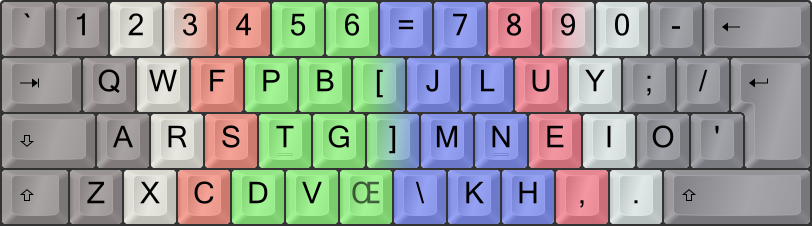
The Colemak Curl(DH)AngleWide, a.k.a. Colemak-CAW, ergo modded layout.
There are special Tarmak steps to learn Colemak-DH gradually should you want to. See below.
[2.3] PLAYING WITH THE SYMS
For the most enthusiastic layout modders, I've made a symbol key rotation mod that I simply call Sym. It's only implemented for some layout variants so far, notably the fully ergo modded Colemak-CAWS variants. There are a few possibilities, see the EPKL files and docs.
  \   7   8   9   0   =
[   j   l   u   y   '   -
 ]   h   n   e   i   o   ;
   /   k   m   ,   .   _____
The full "Sym" symbol rotation mod, shown with the Wide(ISO) mod.
[2.4] MODIFIER MODNESS (Work-In-Progress)
EPKL supports Sticky or One-Shot modifiers. You can specify one or more keys as sticky and they'll still work as modifiers a little while after you release them. So you can tap, e.g., a Shift key and then a letter to produce a capital letter instead of having to hold down the Shift key. Many fast typists like this.
If you're fast enough you can even chain these OSMs, for instance tapping RCtrl, RShift and LeftArrow in rapid sequence to select the last word. But for that I'd prefer using Extend+S+T+O.
Otherwise, EPKL can be finicky about modifier mapping. All keys that are intended to work as OSMs or Extend release keys must be mapped in some way – such as setting them to 'Modifier' or 'VirtualKey' if you don't want to map them further. But doing this with LCtrl and/or RAlt seems to mess with the AltGr functionality if you're using that. Also, the LAlt key often causes trouble in some apps if mapped. Carefully test the mappings you want.
[3] Layout Variants
[3.1] THE TARMAK TRANSITIONAL COLEMAK LAYOUTS
There's a main forum topic on this that you may want to read.
See below for a download of all four steps plus "Tarmak0" (a.k.a. QWERTY) and "Tarmak5" (a.k.a. Colemak).

The 5-step Tarmak (transitional Colemak) layouts, spectrally color-coded from red (Tarmak#1) to violet (Colemak).
These transitional layouts were implemented as VirtualKey ones, so any AltGr and dead key mappings you'll get will be the same as on your installed keyboard layout in Windows. The layouts should support Extend mode fully. If you define several of them in your EPKL settings file, you can swiftly change between them should you wish to.
My EPKL settings file comes with lines prepared for Tarmak progressions that you may simply uncomment (commenting out whatever else 'layout =' lines are active there) and start using. You may choose between a progression to vanilla Colemak or to Colemak-DH (see above). Wide mods are not (yet) available for Tarmak, but they may not be that necessary as you can always go Wide after you've reached the goal.
There's a help image for each step, that you can see or hide with the shortcut Ctrl+Shift+1 (configurable in pkl.ini). Holding Shift will show the current and previous steps in different colors.

The help image for the third Tarmak-Curl step. Unshifted version.
[3.2] LOCALE & PHONETIC COLEMAK VARIANTS
See my Locale Variants forum topic for the various locale and non-latin script solutions!
(Warning: In some cases you'll have to change the PKL files yourself, or ask for help. Check the Layouts\Colemak-eD folder to see which ones exist already.)
The locale layouts I've provided so far include the "Latin" layouts for French(BeCaFr)/Portuguese(BrPt)/Spanish(EsLat)/Italian(It), "Germanic", Slavic and some others. These are for the most part set up with the CurlAngleWide mod but you could change that in the [eD_info] of the layout – however, the help images would have to be remade to reflect the changes. The locale layouts may work for, say, a US keyboard too, but you'd miss an important key in OEM_102.
To make your own locale variant you'll want to copy the layout folder for my eD layout over to a new one, renaming it (and putting that new name into your pkl.ini file so the program can choose it!) and then editing the layout.ini file in there.
I don't quite recommend the "Keep Local Symbols" variants but if you do wish to keep your symbol keys unmapped it's quite simple to just comment them out in the layout. Sometimes though, there's a base layout that maps these symbols so you'd have to do it in that file instead.
If you want help images for a locale variant that doesn't have them already, you can use Inkscape (portable or installed) with the PKL[eD] Help Image Generator. Or ask me, if it's a variant others could be interested in.
The dead key images can for the most part be borrowed from another layout with a compatible board type and ergo mod. A few glyphs may be off but for the most part that won't matter to you. If you need the combining accents released by øØœŒ in my layouts, just add the required letters somewhere in yours.
Example from my layout file showing Norwegian vs standard ISO mappings:
SC013 = P    1    p    P    --    π    ¶    ; QWERTY rR
SC014 = G    5    g    G    --    ŋ    Ŋ    ; QWERTY tT
;SC015 = OEM_4    4    [    {    *{Esc}    å    Å    ; QWERTY [{ ; Cmk-eD_ISO
SC015 = OEM_4    1    å    Å    *{Esc}    [    {    ; QWERTY [{ ; Cmk-eD-No
SC016 = J    5    j    J    --    ʃ    Ʃ    ; QWERTY yY
Note the following:
• The OEM_4 (Left Bracket) key has scan code SC015 so it's in the middle now; this is the Wide ergonomic mod in action
• The Norwegian Åå letter on LBr is on lv1-2 mappings due to this being my Norwegian locale layout;
the only keys that deviate from the standard setup here are LBr(OEM_4), RBr(OEM_6) and LSGT(OEM_102).
• On your keyboard the OEM_# numbers could be different as there's a difference between US/ANSI and Euro/ISO boards; try it out...
[3.3] MIRRORED COLEMAK
EPKL supports multiple Extend layers. This could be used to get Mirrored Colemak by replacing the Extend mappings, usually the first layer (Ext1). You can't have both at the same time without using additional modifiers unfortunately. And that's too bad since the Mirrored plus Extend combo would be a damn handy thing for one-handed typers!
If you look into the _eD_Extend.ini file you'll find a Mirror section at the very end. It's still a work-in-progress though; let me know if you want to use it and need help! It may be a better idea to make a mirrored layout and make a modifier for it though, but I'll have to look into that option.
[4] DOWNLOAD AND SETUP
There's a separate Download and Setup post below.
DONE:
• 2014-01-25: Added ANSI VirtualKey QWERTY+Colemak with the Wide(Quote) mod
• 2014-05-21: Revamped Tarmak layouts, with better docs, icons, help images etc
• 2014-11-06: Complete help image set for the Colemak-eD_ISO layout, dead key enhancements and Latin locale variants
• 2015-06-25: Tarmak layouts with help images and pkl.ini files for ISO/ANSI; Curl(DH)Angle ergo mods for ISO/ANSI (AngleZ and A-Wing)
• 2016-01-27: Implementation of the Tarmak steps up to and including the Curl(DH) ergo mod, as vk_layouts.
• 2017-08-08: Implementation of the new unified Colemak-DH mod. Also, I finally moved everything to GitHub.
• 2019-01-18: Lots of things have been added to EPKL/PKL[eD] at GitHub, including Multi-Extend and Sticky/One-shot modifiers.
TODO:
• Whatever I want to do with the layouts and stuff themselves, I'll discuss it in the main Big Bag topic.
• There's quite a lot that could be done with these files. More locales and help images, both wide and nonwide file sets...
• However, I'll only do any of that if someone really needs help and asks very nicely. ;)
• The main problem is that since EPKL definitions aren't as modular as the XKB ones I'd have to make any changes in multiple file sets at once. Ugh.

My Unicomp SpaceSaver Buckling Spring (IBM Model M ISO type) keyboard with "American/Ninja" caps, splendidly sporting the Colemak-CAW layout.
*** Learn Colemak in 2–5 steps with Tarmak! ***
*** Check out my Big Bag of Keyboard Tricks for Win/Linux/TMK... ***